Running Claude Code CLI with Claude Router
Let's try to save on tokens and run Local LLMs
I have been playing around with the Claude CLI tool, Claude Code. Its supprisingly good, and we get to use the newest Claude models. However, we are limited to the token restriction by Anthropic... So why not try to use some of the open source models and run it on our own hardware?
The Architecture: Understanding the Components
We still want to use the Claude Code CLI tool, since it's so handy, but we dont want to route the requests to the Anthropic API. Instead we want to route the traffic to our own server. It's here the Claude Router comes into play. Let's walk through the different components.
Component 1: Claude Code CLI
This is a tool developed by Anthropic to interface with Claude. We can use it in the terminal to ask for coding related questions and it can interface with VS code.
Component 2: Claude Router
Claude Rotuer is open source, and acts as a proxy that can intercept requests that we are making through Claude Code. It will be redirecting the traffic to our own OpenAI-compatible API server.
Component 3: LM Studio
We will use LM studio to interface with our LLMs locally. Today its running on my Mac M4 with 48GB of RAM.
Component 4: Qwen3 Coder 30B
For the brains of the project, I went with the Qwen3 Coder 30B which is a open-source model made for coding tasks.
The Setup Process and Network Architecture
[Claude Code CLI] → [Claude Router] → [LM Studio] → [Local LLM]
     (Terminal)        (Proxy)         (Server)      (AI Model)
Network Architecture
I have a setup with two machines
- A Beelink Mini PC running a headless ubuntu 22.04 server. This is where we are doing some cross compilation and where Claude Code is running.
root@syscall:/home/calle# uname -a
Linux syscall 6.8.0-85-generic #85-Ubuntu SMP PREEMPT_DYNAMIC Thu Sep 18 15:26:59 UTC 2025 x86_64 x86_64 x86_64 GNU/Linux
- A Mac M4 with 48GB RAM, this is where LM studio is running.
Installing Claude Rotuer
I decided to go with Bun, supposedly a faster and more modern JavaScript runtime.
curl -fsSL https://bun.sh/install | bash
Now we can run Claude Router directly/starting a coding session.
~/.bun/bin/bunx @musistudio/claude-code-router code
Configuring LM Studio
First we need to download the local model on LM studio. I downloaded Qwen3 Coder 30B, its a reasonably good model and its only ~18GB. Remember to start the server under server settings and make sure the "Serve on Local network" is toggled on. Then we should see an ip:port where the model is reachable at. In my case
http://192.168.XX.XX:1337
Claude Code will send large prompts, so we need to increase the context length. I went with a context length of 65536.
The Configuration File
We need to tell Claude Router where to route the traffic to. We do that in the config.json file. It can be found here: ~/.claude-code-router/config.json Here is my config.json file for added context.
{
  "LOG": true,
  "Providers": [
    {
      "name": "openai",
      "api_base_url": "http://192.168.XX.XX:1337/v1/chat/completions",
      "api_key": "sk-1234",
      "models": ["qwen/qwen3-coder-30b"]
    }
  ],
  "Router": {
    "default": "openai,qwen/qwen3-coder-30b"
  }
}
Let's test it
First we start a coding session using Claude Router
~/.bun/bin/bunx @musistudio/claude-code-router code
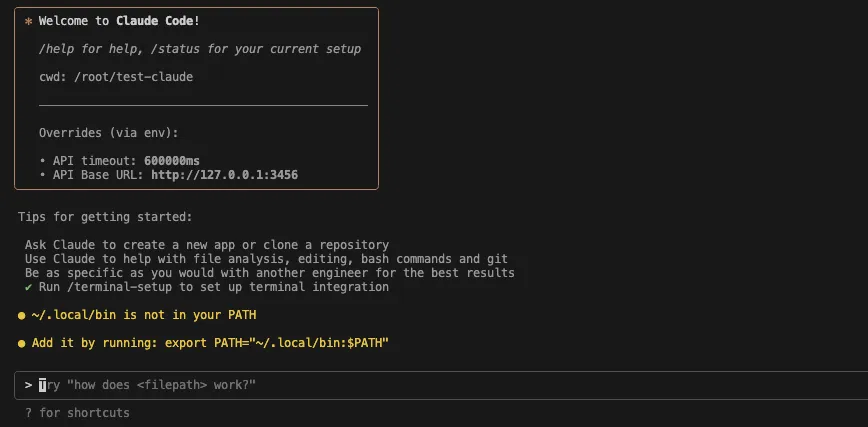
Looks like we are getting our coding session. Let's see if we can post some queries. I posted the question "Can you show me the seahorse emoji"
And we can see the data being processed in LM Studio
2025-11-19 17:26:27  [INFO]
 [qwen/qwen3-coder-30b] Prompt processing progress: 0.0%
2025-11-19 17:26:28  [INFO]
 [qwen/qwen3-coder-30b] Prompt processing progress: 3.8%
2025-11-19 17:26:29  [INFO]
 [qwen/qwen3-coder-30b] Prompt processing progress: 7.7%
2025-11-19 17:26:30  [INFO]
 [qwen/qwen3-coder-30b] Prompt processing progress: 11.5%
2025-11-19 17:26:31  [INFO]
 [qwen/qwen3-coder-30b] Prompt processing progress: 15.4%
2025-11-19 17:26:32  [INFO]
 [qwen/qwen3-coder-30b] Prompt processing progress: 19.2%
2025-11-19 17:26:33  [INFO]
 [qwen/qwen3-coder-30b] Prompt processing progress: 23.1%
2025-11-19 17:26:34  [INFO]
 [qwen/qwen3-coder-30b] Prompt processing progress: 26.9%
2025-11-19 17:26:35  [INFO]
 [qwen/qwen3-coder-30b] Prompt processing progress: 30.8%
2025-11-19 17:26:36  [INFO]
 [qwen/qwen3-coder-30b] Prompt processing progress: 34.6%
2025-11-19 17:26:38  [INFO]
 [qwen/qwen3-coder-30b] Prompt processing progress: 38.5%
2025-11-19 17:26:39  [INFO]
 [qwen/qwen3-coder-30b] Prompt processing progress: 42.3%
2025-11-19 17:26:40  [INFO]
 [qwen/qwen3-coder-30b] Prompt processing progress: 46.2%
2025-11-19 17:26:42  [INFO]
 [qwen/qwen3-coder-30b] Prompt processing progress: 50.0%
2025-11-19 17:26:43  [INFO]
 [qwen/qwen3-coder-30b] Prompt processing progress: 53.9%
2025-11-19 17:26:45  [INFO]
 [qwen/qwen3-coder-30b] Prompt processing progress: 57.7%
2025-11-19 17:26:46  [INFO]
 [qwen/qwen3-coder-30b] Prompt processing progress: 61.6%
2025-11-19 17:26:48  [INFO]
 [qwen/qwen3-coder-30b] Prompt processing progress: 65.4%
2025-11-19 17:26:49  [INFO]
 [qwen/qwen3-coder-30b] Prompt processing progress: 69.3%
2025-11-19 17:26:51  [INFO]
 [qwen/qwen3-coder-30b] Prompt processing progress: 73.1%
2025-11-19 17:26:52  [INFO]
 [qwen/qwen3-coder-30b] Prompt processing progress: 77.0%
2025-11-19 17:26:54  [INFO]
 [qwen/qwen3-coder-30b] Prompt processing progress: 80.8%
2025-11-19 17:26:56  [INFO]
 [qwen/qwen3-coder-30b] Prompt processing progress: 84.7%
2025-11-19 17:26:57  [INFO]
 [qwen/qwen3-coder-30b] Prompt processing progress: 88.5%
2025-11-19 17:26:59  [INFO]
 [qwen/qwen3-coder-30b] Prompt processing progress: 92.4%
2025-11-19 17:27:01  [INFO]
 [qwen/qwen3-coder-30b] Prompt processing progress: 96.2%
2025-11-19 17:27:03  [INFO]
 [qwen/qwen3-coder-30b] Prompt processing progress: 100.0%
2025-11-19 17:27:06  [INFO]
 [qwen/qwen3-coder-30b] Finished streaming response
The results are as expected, totally wrong, but that's expected. No amount of compute in the world would be able to find the seahorse emoji.
